Turbonet and Broadband Sim Cards are not eligible for this offer.
Please do not place orders for the same number at the same time interval. One will be rejected and no refund will be provided.
Data bundle delivery is not instant. Some numbers may receive data faster while others take some time.
No refunds will be issued for wrong transactions or incorrect phone numbers.
Please verify your phone number carefully before making a purchase.
Important Notice
Data bundle delivery is not instant. Some numbers may receive data faster while others take some time.
No refunds will be issued for wrong transactions or incorrect phone numbers.
Please verify your phone number carefully before making a purchase.
Important Notice
Refunds: We do not offer refunds for wrong phone number entries.
AirtelTigo Numbers Only: This bundle works only with valid AirtelTigo numbers.
Double-Check: Please verify the recipient’s number before confirming your purchase.
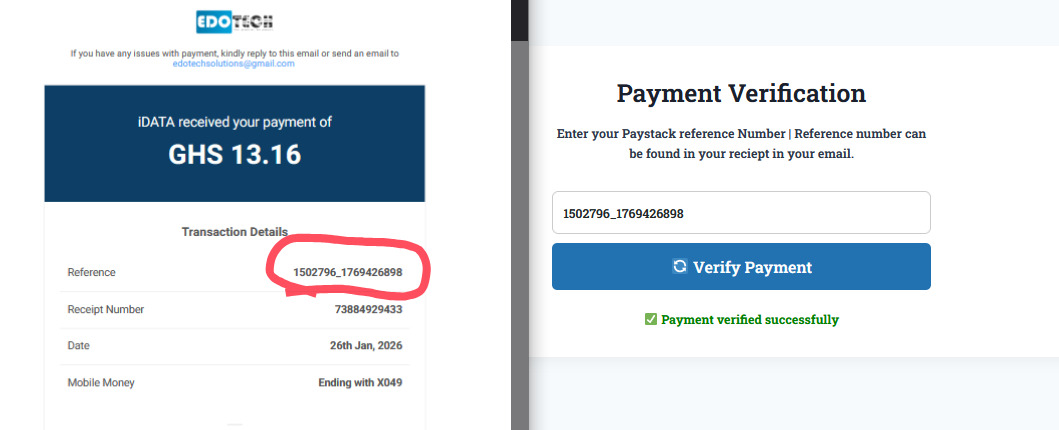
How to Approve Pending Payment
1. Check your email for the payment reference number from Paystack.
2. Go to the site menu, select “Verify Payment,” and enter the reference number.
3. Click “Verify Payment” to update your order status to “Approved.”
How to check data balance
HOW TO CONFIRM YOUR MTN DATA ON MTN APP 1.Open MTN App on your phone* 2. Click on Data icon 3. Scroll down and look for Master Beneficiary Data bundle
HOW TO CHECK AIRTELTIGO DATA Dial *504# SMS will be sent to you, it will show iShare or Big Data balance
HOW TO CHECK TELECEL DATA Dial *126# You will get prompt showing internet Data balance You can also use Telecel App to check